 One app.
Your entire day.
Plan your day with Eva: tasks, habits, notes, an AI assistant and a focus timer. Free on iPhone, with optional web sync. No ads or subscriptions.
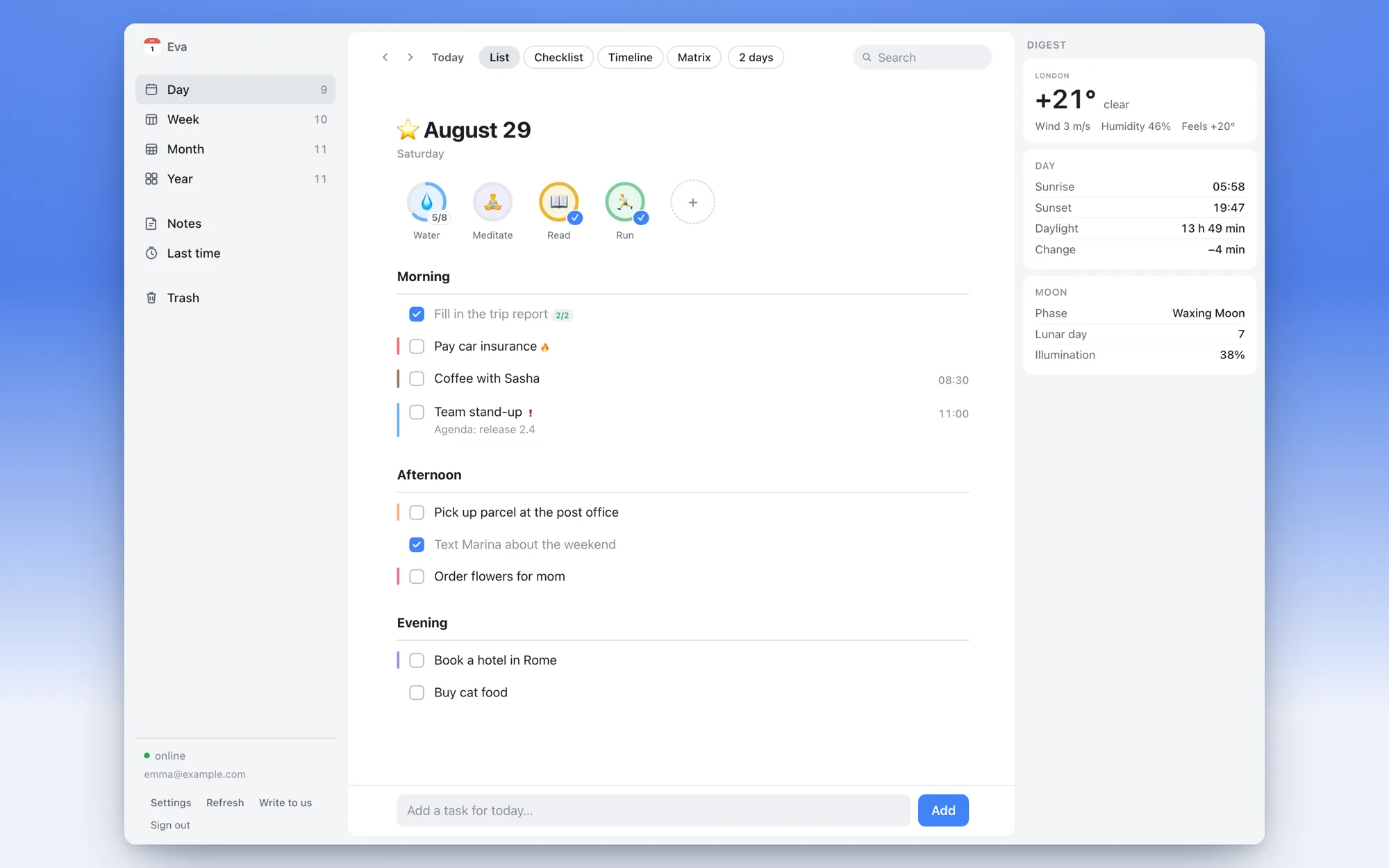
Eva, now in your browser.
Open Eva on any computer — tasks, habits and notes sync live with your iPhone. Sign in with your email: a one-time code, no password.
Your day, right on
the lock screen.
Eva turns your tasks into a beautiful lock screen wallpaper — tasks, habits, weather, year progress and a daily quote. It refreshes itself every morning and when you close the app.
- Your real tasks & habits, always in sight
- Your own photo or a gradient background
- Auto-updates — no tapping needed
Eva is coming to Android
We're building the Android version right now. Leave your email and you'll be the first to know when it's out.
One email at launch. No spam, no sharing your address.
Your daily
vibe check.
30+ personalized blocks every morning. Weather, horoscope, biorhythms, what to wear, air quality, moon phases, holidays — your perfect daily briefing.
- Weather, pressure & magnetic storms
- Biorhythms — productivity, sport, creativity
- Horoscope with love, career & health aspects
- Clothing recommendations for the day
- Reorder and toggle any block you want
Your calendar
could never.
Eva brings everything together — tasks by morning, afternoon, evening. Voice input, 12 highlight colors, habits, two-way sync with Apple Calendar & Reminders.
- Voice input — speak, Eva sorts it out
- 12 highlight colors to organize your way
- Two-way sync with Apple Calendar & Reminders
- Habit tracking with weekly schedules
Enter the
flow state.
Built-in Pomodoro timer with ambient sounds that turn your phone into a focus machine. Do Not Disturb enables automatically.
- Pomodoro, short & custom presets
- 13 ambient sounds — rain, fireplace, waves
- Live Activity timer on lock screen
- Focus statistics to track your deep work
Automatic Do Not Disturb requires an automation you set up in Apple Shortcuts.
Zebra
A photo & video editor for content. Background & object removal, AI styles (Ghibli, anime, watercolor) and film filters — Kodak, Fuji, Polaroid — fast and beautiful.
📱 The iPhone app has even more: offline object removal, collages and carousels, text with effects, stickers and DuoCam capture — things the browser doesn't have.
Wait, there's more.
Everything you need, nothing you don't.
AI Assistant
Snap a photo of tickets — Eva creates events. Ask anything about your schedule.
Todo Lists
Shopping, ideas, goals — separate lists with confetti on completion.
Last Time
Track when you last did something. Haircut, cleaning, watering plants.
Widgets
35+ widgets — home screen, lock screen, Live Activities.
Apple Calendar
Two-way sync of events, birthdays, and reminders.
Smart Reminders
9 snooze options, complete from notification, custom sounds.
Offline
Works without internet. Always.
Statistics
Mood, habit & focus trends over time.
Eisenhower Matrix
Sort tasks by urgency & importance. Add right in each quadrant.
Movies & TV
Track releases from TMDB. Get reminded when they drop.
Shift Schedule
Rotating work patterns (2/2, day/night) as colored calendar days.
Water Tracker
Log water & caffeine. Tap the widget to add a cup.
5-Year Journal
One line a day. See this date across every year.
Memory Game
Card-matching brain trainer with a global leaderboard.
Notes
Quick notes with checklists, photos and formatting.
Weight Tracker
Log your weight in seconds and watch the trend.
Steps
Daily step goal with progress rings on your calendar.
More than
just dates.
Your calendar knows about mercury retrograde, beauty days, menstrual cycles, coffee rituals, and holidays. Life markers that no other planner has.
Mercury Retrograde
Know when to be careful
Beauty Calendar
Haircut, manicure & cosmetology days
Cycle Tracking
Phases, PMS & HealthKit sync
Coffee Ritual
Thursday cinnamon coffee tradition
Holidays
Public holidays for your country
Birthdays
Multi-day reminders from contacts
Eva's got
your back.
Flexible snooze options that understand your day. Not now? Snooze for 10 minutes, 3 hours, or reschedule to tomorrow morning.
- 9 snooze options — from 10 min to tomorrow
- Morning, afternoon, evening presets
- Complete tasks from notification
- Custom time picker
How are you
feeling today?
Track your mood every day with a beautiful 5-level scale. See patterns, discover trends, understand yourself better.
Weekly trends, monthly statistics, and gentle daily reminders to check in with yourself.
Your data.
Your choice.
Use the iPhone planner without an account. Web sync is optional and needs email sign-in. AI requests and online digest features use the internet.
Questions about Eva
Is Eva free?
Yes. Eva is free, with no subscriptions, in-app purchases or ads.
Does Eva work offline?
Tasks, habits and notes work offline on iPhone. AI requests, fresh weather and web sync need an internet connection.
Can I use Eva on a computer?
Yes. Open web.evacalendar.app in your browser. Enable the web version in the iPhone app and sign in with your email and a one-time code to sync tasks, habits and notes.
Is there an Android app?
The Android app is in development. Join the waitlist on this page for a launch notification. The iPhone app requires iOS 18 or later.